Google Business Profile photos
Business Profile photo rejected? Find the cause first
First check where the photo got stuck. If Google refuses the file during upload, the file is usually the problem: Google accepts JPG or PNG between 10 KB and 5 MB, at least 250 × 250 pixels. Make a JPG copy under 5 MB. If the photo shows Pending or Not approved instead, compressing it again will not help – see below.
Files are processed locally.
On this page
Where did the photo get stuck?
On a computer, search Google or Maps for your business name and city, then open Photos in your Business Profile. Each upload shows its status there.
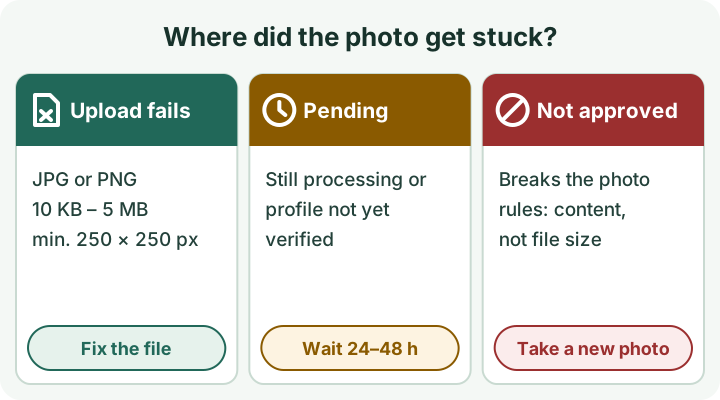
- Upload fails or the file is refused: one of the file values is outside Google's range. Follow the four steps below.
- Pending: Google is still processing the photo, or your profile is not verified yet. Customers do not see pending photos. Allow up to 24–48 hours, and finish verification first if it is still open. A new copy will not speed this up.
- Not approved: Google flagged the photo as breaking its policies. That is about what the picture shows, not about its file size. Read the photo rules further down and take a better photo.
Fix the file in four steps
- Format
- JPG or PNG
- File size
- 10 KB to 5 MB
- Minimum size
- 250 × 250 pixels
- Recommended
- 720 × 720 pixels (not a required exact size)
- Quality
- In focus, well lit, no significant alterations or excessive filters
- Keep the original and work on a copy. If the photo is an iPhone HEIC file, first create a JPG with HEIC to JPG (one still image up to 48 megapixels).
- Open the target-size compressor and choose the photo – or use the link at the top, which fills in the values for you: Maximum file size 4900 KB and, under Further requirements, Allowed format set to JPG required. Without that setting a PNG would become WebP, which Google does not list. If the tool reports Original already fits, upload the unchanged original instead.
- Check the pixels. The image dimensions tool shows width × height as soon as you choose the photo. If a side is shorter than 250 pixels, find a larger original: enlarging a small image does not add detail. You do not need to crop to exactly 720 × 720.
- Download the result, upload that copy in your Business Profile and check its status again after 24–48 hours.
Not approved: what no tool can fix
Google's media guidelines for Maps describe what an acceptable photo looks like. For a business photo these points matter most:
- Take the photo yourself, at the place you are posting it for. Avoid stock photos, screenshots, collages and GIFs.
- Make the business the main subject, not people or selfies.
- Keep it sharp and bright enough. Avoid blurry, very dark or rotated images.
- Light filters are fine if the photo still looks accurate. Avoid added borders, text or heavy editing.
A sideways photo is the one case a tool can solve: turn it upright with Rotate image and upload the copy.
Logo or cover photo not showing
- Logo: Google only shows it when the profile has a name, a valid street address, categories, a phone number and opening hours.
- Cover photo: if Google considers your chosen cover low quality, or other sources suggest a better image, it may show a customer's photo instead.
Sources and limits
Checked on 4 October 2026 against Google Business Profile Help and the Google Maps media guidelines. Google can change these rules, so check the linked pages if a value looks different. This independent guide was written with AI assistance and checked against those pages and the Refentra tools. Refentra is not affiliated with Google: the tools process your photo in your browser, and you upload the copy to Google yourself.
Photo requirements and status · Maps media guidelines · Business Profile support
Hitting a different upload limit? Read Image too large to upload.