Shopify image uploads
Shopify says your image is too large, but it is under 20 MB
In the theme editor, Shopify rejects images with more than 20 megapixels — and the error still talks about “20 MB”. The fix is fewer pixels, not more compression: open the resizer set to fit within 4000 × 4000 px, download the copy and upload that instead.
Files are processed locally.
On this page
Check: is it the megapixels?
Megapixels = width × height ÷ 1,000,000. A typical 24-megapixel camera photo is 6000 × 4000 px = 24 MP; Shopify's own example is 5000 × 5000 px = 25 MP. Both are over 20 MP even if the file is only a few MB. You can see width and height in the file's properties (Windows) or in Get Info / Preview (Mac).
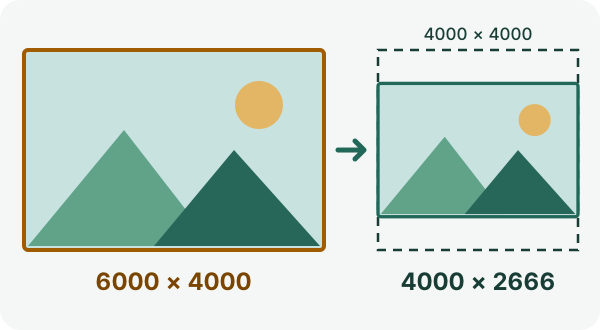
That is 24 MP before and 10.7 MP after — well under the 20 MP limit. The output dimensions come from the resizer's own calculation (it rounds down to whole pixels), not from a test upload to Shopify.
Fix it in four steps
- Keep your original. Use the link at the top of this page: width 4000, height 4000, “Fit within maximum dimensions” and “Prevent upscaling” are already set.
- Choose your image (JPG, PNG or WebP). The tool shows the dimensions the result will have.
- Tap “Apply image dimensions”, then “Download resized image”.
- Upload the downloaded copy in Shopify. Then check in the theme preview that the image looks right.
Which limit applies where
- Theme editor (image fields)
- Max. 20 MP and 20 MB
- Content > Files
- Max. 25 MP and 20 MB
- Product and collection images
- Up to 5000 × 5000 px or 25 MP, smaller than 20 MB; 2048 × 2048 px usually displays best for square images
Shopify Help, checked 4 October 2026.
The 4000 × 4000 box fits all three areas. For product photos, Shopify's suggested 2048 × 2048 px is enough and gives a smaller file.
When this will not help
- The image is already within the pixel and byte limits: upload the unchanged original once more, check its real file type, and contact Shopify support with the exact error text.
- Refentra's tools open JPG, PNG and WebP images up to 25 MiB and 64 MP. Shopify also accepts other formats (for example HEIC or TIFF); those need a different tool.
- If the image must keep more than 20 MP for printing or zooming, the theme editor is the wrong place; check whether Content > Files or the product media area (25 MP) fits your use.
Other upload errors (file type, exact dimensions, KB limits) are covered in image too large to upload.
Sources
Limits checked against Shopify Help on 4 October 2026. Refentra is independent of Shopify. Images are processed in your browser and not uploaded to Refentra; you upload the copy to Shopify yourself. This guide was drafted with AI assistance and checked against the linked help and the current tools. Theme image uploads · Files requirements · Product media limits